
Before You Decline: Read This First
Two of the most common reasons venues decline enquiries are budget and dates — and both can be misleading.
Dates are often flexible. A significant proportion of enquiries we see declined for date conflicts turn out to have clients who were open to alternatives. Always check. It takes 30 seconds to ask.
Budgets are rarely final. Clients don't always know what their event will cost when they first enquire. We've seen contracts signed at double the original budget stated on the enquiry form. Treat the budget as a starting point, not a hard ceiling.
Tip: The venues performing best on Canvas don't just consider whether the enquiry fits right now — they see every enquiry as a relationship. You might not have availability for a Christmas party, but what about a conference next spring, or a summer away day? A brief, friendly reply keeps that door open.
How to Decline an Enquiry
Step-by-Step
- Open the enquiry in your Canvas dashboard.
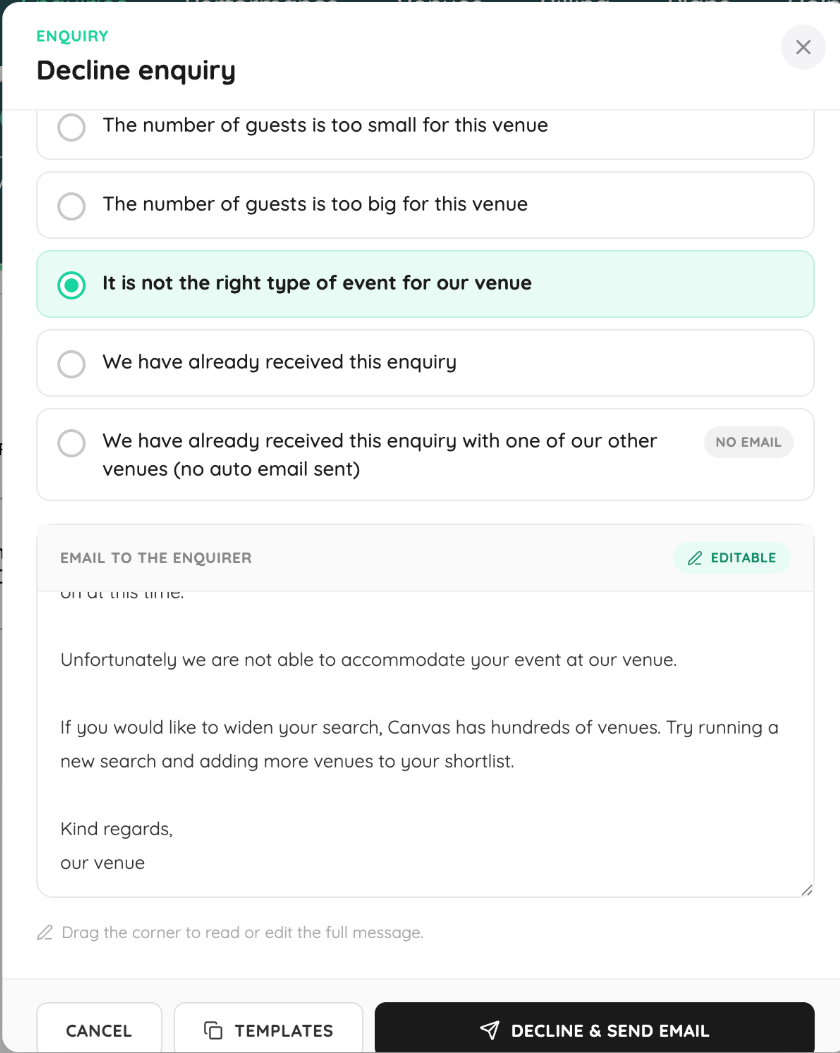
- Select Decline.
- Choose a reason from the preset response options, or edit the message to personalise it.
- If you have message templates saved, you can select one of those instead.
- If you've already received the same enquiry via one of your other venues, you can choose to decline without sending a message to the client — it will simply be logged on the dashboard.
- Confirm the decline.
Once declined, the enquiry moves to Lost and the client's contact details are no longer accessible. Because you haven't been in direct contact with them, this is by design.
Important: If you decline an enquiry by mistake, contact the Canvas support team within 5 working days and we can move it back to New for you.
Response Time: Why It Matters
You have 5 working days (excluding evenings and weekends) to respond to a new enquiry before it's marked as "venue did not respond."
You'll also receive reminders within a 12 to 24-hour window — because response time has a direct impact on conversion.
Here's what the data shows:
| Response Time | Impact on Conversion |
|---|---|
| Under 5 hours | Optimal — this was the average response time for bookings last year |
| 12 to 24 hours | Noticeable drop in likelihood to convert |
| 24 to 48 hours | Up to 25% reduction in conversion opportunity |
| No response | Enquiry marked as unresponded; opportunity lost |
💡 Tip: If you're consistently responding beyond the 5-hour mark, it's worth reviewing how enquiry notifications are set up on your account.
Important Notes
- Once an enquiry is declined, it moves to Lost and cannot be reopened (except within the 5-working-day window via support).
- Client contact details are not accessible after a decline.
- You can decline without notifying the client if the same enquiry has already come through on another venue you manage.
- Preset responses are there to save you time, but you can edit them or use your own templates.
Still Need Help?
If you've declined an enquiry by mistake, or you have questions about managing enquiries on your dashboard, get in touch with the Canvas support team and we'll sort it out.
A note worth keeping in mind: The venues that generate the most revenue through Canvas are the ones that treat every enquiry as an opening, not just a transaction. A quick, thoughtful reply — even to decline — leaves a lasting impression.